

A CRM audit is a targeted review that finds revenue-risking data and process problems and produces a ranked remediation plan your leaders can act on in one to three weeks. The immediate next step is a quick pipeline sanity check: pull open deals, scan close dates and amounts, and flag anything that looks stale. From there, the full audit delivers ranked findings, named owners, and a timeline.
TL;DR:
- Conducting a CRM audit should include analyzing data quality, pipeline structure, automation, reporting, user adoption, and integrations, with separate data exports for each area.
- Prioritize findings based on their impact on decision-making and dollar exposure, focusing on revenue risks like stale deals or duplicate accounts.
- Deliver a concise, one-page summary with ranked findings tied to specific decisions and owners, along with actionable recommendations and verification artifacts.
- Run a quick 1 to 3 day audit first to identify major leaks before requesting budget for a comprehensive full-system review.
- Outsourcing a Revenue Leak Assessment can save internal time, providing a prioritized, dollar-based list of fixes, especially when multiple systems or teams are involved.
Table of Contents
- What a CRM Audit Actually Covers
- The Six Domains Every CRM Audit Checklist Should Cover
- How Do You Run a CRM Audit Step by Step?
- How Do You Prioritize CRM Audit Findings?
- What Should a CRM Audit Deliver?
- When Should You Run a CRM Audit?
- The 1 to 3 Day Quick CRM Audit Checklist
- How Sales-Phoenix Applies a Structured Framework to Audits
- If You'd Rather Outsource: The Revenue Leak Assessment
- Common Pitfalls When Running a CRM Audit
- Sources
What a CRM Audit Actually Covers
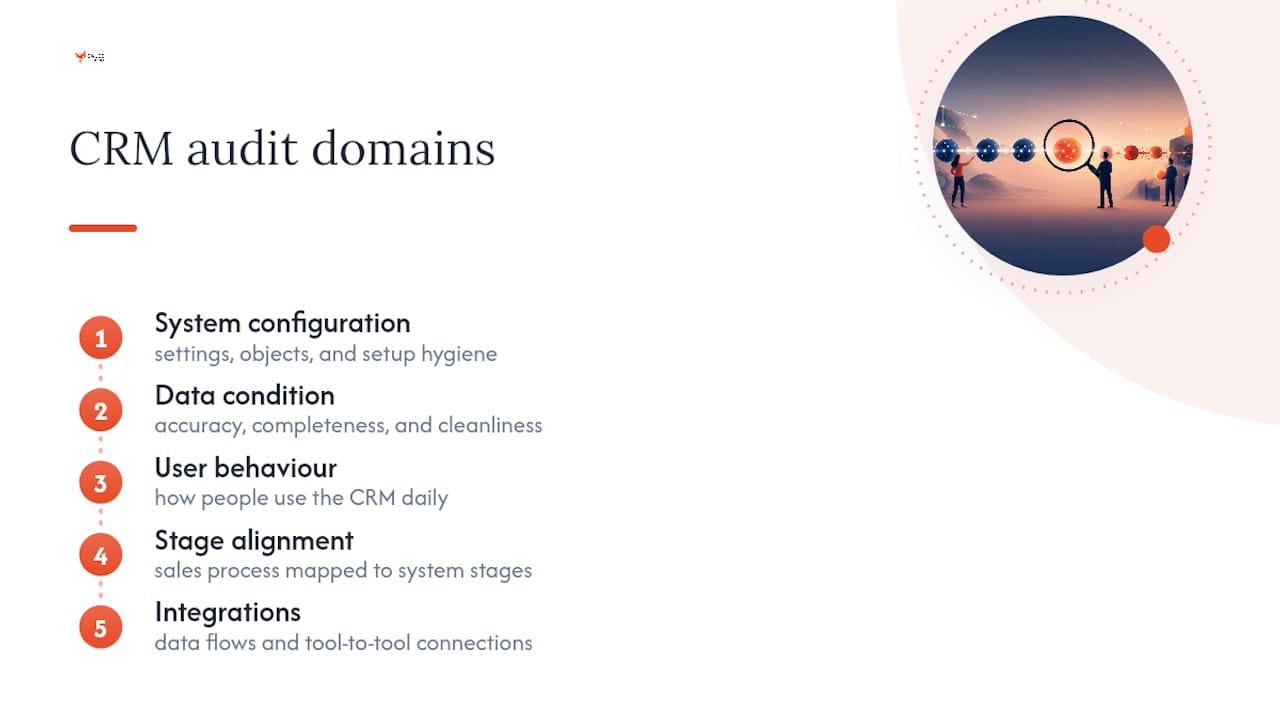
A full CRM audit looks at five things at once: how the system is configured, the condition of the data inside it, how people actually use it day to day, whether your sales process maps to the stages in the system, and how cleanly it talks to other tools. Skip any one of those and you get a partial picture that misses where the real risk sits.
The payoff is concrete. A clean audit improves forecast accuracy, surfaces deals that quietly stalled, and puts a dollar figure on exposure leadership can act on. It also tends to catch missed opportunities that were sitting in the pipeline the whole time, just mislabeled or forgotten.
Sponsorship matters here. A RevOps lead or CRM administrator should own the mechanics, a sales manager should validate what "normal" looks like on the floor, and an executive sponsor needs to be attached from day one, since findings almost always touch budget and headcount decisions.
The Six Domains Every CRM Audit Checklist Should Cover
Auditors organize the work around six functional areas: data quality, pipeline structure, automation, reporting, user adoption, and integrations. Each one has its own failure modes, and each shows up differently depending on whether you're running a salesforce audit checklist or a hubspot audit checklist, but the categories themselves don't change.
- Data quality: duplicate records, missing required fields, decay rates on contact information, and inconsistent formatting across teams.
- Pipeline and stage structure: whether stage definitions are documented, whether exit criteria are enforced, and whether reps actually move deals through in a way that matches the defined process.
- Automation and workflows: trigger logic that fires incorrectly, workflows hitting rate limits, and silent errors that nobody's been alerted to.
- Reporting and dashboards: can you reproduce the numbers on your top reports straight from raw records, or does the dashboard show something the underlying data doesn't support?
- User adoption and permissions: login frequency, activity logs, and whether role-based access actually matches how people work.
- Integrations and data flows: field mapping between systems and whether a test record actually round-trips correctly.
Each domain needs its own data export. Trying to eyeball all six at once from the CRM's native views is how audits miss the expensive problems.
How Do You Run a CRM Audit Step by Step?
A structured sales process audit runs in six phases, and each one produces something concrete before you move to the next.
- Prepare. Define the objective, name the sponsor, set scope, and pull the required extracts: field lists, full pipeline export, and activity logs going back at least two quarters.
- Review configuration and documentation. Compare what's documented against what's actually built. Most gaps show up right here, before you've touched a single data row.
- Assess the data. Run queries for duplicates, missing critical fields, and stale records. Cross-check a sample of records manually against what you'd expect a healthy record to look like.
- Analyze usage and adoption. Pull login frequency, records created or updated per user, and pipeline activity per rep. Yesware's research on CRM adoption confirms sales teams often resist the tool unless usage is actively tracked and reinforced.
- Test integrations. Push a sample record through each connected system and confirm it round-trips without dropped or mismatched fields.
- Validate reporting, then interview. Try to rebuild your top three reports from raw exports. Then talk to the people who use the system daily and observe a few live sessions before finalizing recommendations.
Each phase should produce a short artifact: a gap list, a query output, an adoption scorecard. Those artifacts become your appendix later.
How Do You Prioritize CRM Audit Findings?
Every finding should map to a decision it corrupts and a rough dollar exposure, not just a severity label. A stale open deal that's been sitting for 90 days with no activity isn't just untidy. It's inflating your forecast and possibly blocking a rep's quota conversation. Duplicate accounts split attribution and hide true deal size.
- List each problem next to the specific decision it distorts (forecast, quota, territory assignment).
- Estimate the dollar exposure using historical average deal size for comparable stale or duplicate records.
- Score each finding on impact versus effort, then rank the backlog by impact first.
Statistic: Fast, revenue-focused diagnostics often turn up 10% or more of open pipeline value that's stale or inflated, which is usually enough on its own to justify the audit's cost.
Rank by revenue exposure, not by how easy a fix looks. The insight here matters more than it sounds: translating technical findings into business decisions is what actually gets budget approved.
What Should a CRM Audit Deliver?
The output should be short enough that an executive reads it in five minutes. A one-page findings summary tied to owners and ETAs gets budget approved faster than a 40-slide deck ever will.
- One page of ranked findings, each tied to a decision and a dollar exposure.
- One page of recommendations, split between quick corrections and permanent controls, each with a named owner.
- An appendix with the actual record lists and the queries used to find them, so anyone can verify the work.
For timing, a fast pass on a single sales team takes about a week. A full mid-market CRM performance review across multiple teams and integrations runs three to ten days depending on data volume.
When Should You Run a CRM Audit?
Run a full audit annually, with quarterly light checks that revisit whatever got flagged last time. Insightly's audit guidance backs the same annual cadence with lighter quarterly touches. Trigger an off-cycle audit after a major CRM update, a new integration, a reorg, or when forecast accuracy starts slipping and reps start complaining. Get sign-off from RevOps, sales management, and the executive sponsor before you start.
The 1 to 3 Day Quick CRM Audit Checklist
If you don't have a week, run this shortened version first and use it to justify the full audit later.
- Check pipeline sanity: look for close dates clustering suspiciously at quarter end, deal amounts far above your historical closed average, and deals with no logged activity in 60 days.
- Run duplicate detection across accounts, contacts, and opportunities.
- Try to reproduce your top three reports directly from raw record exports.
- Shadow five user sessions to watch where reps actually get stuck or route around the system.
That last step catches things no dashboard will ever show you.
How Sales-Phoenix Applies a Structured Framework to Audits
A proprietary growth framework can be built around the logic: find the leak, size it in dollars, fix it, then install a control so it doesn't come back. Applied to CRM work, that framework maps directly onto the six audit domains, with revenue exposure driving sequencing rather than technical severity. A do-it-yourself audit works well for a single team with clean data; bring in a consultant-led review when multiple systems, teams, or integrations are tangled together.
Pro Tip: Run your quick 1 to 3 day checklist before requesting budget for a full audit. A specific dollar number from real pipeline data gets approval faster than a general request ever will.
If You'd Rather Outsource: The Revenue Leak Assessment
Running a full CRM system evaluation internally takes real hours from people who already have a full plate. If your team doesn't have the bandwidth to pull six domains' worth of exports and chase down every stale record, that's exactly the gap the Revenue Leak Assessment is built to close.
The engagement covers a full audit sales process, prioritized fixes ranked by dollar exposure, recommended controls so problems don't resurface, and a working executive dashboard built from your actual data. Most engagements run on a timeline similar to the mid-market pass described above, scaled to your team's size and system complexity. If your forecast has felt shaky lately or nobody can agree on what the pipeline number actually means, book a Revenue Leak Assessment and get a ranked list of what's costing you money.
Common Pitfalls When Running a CRM Audit
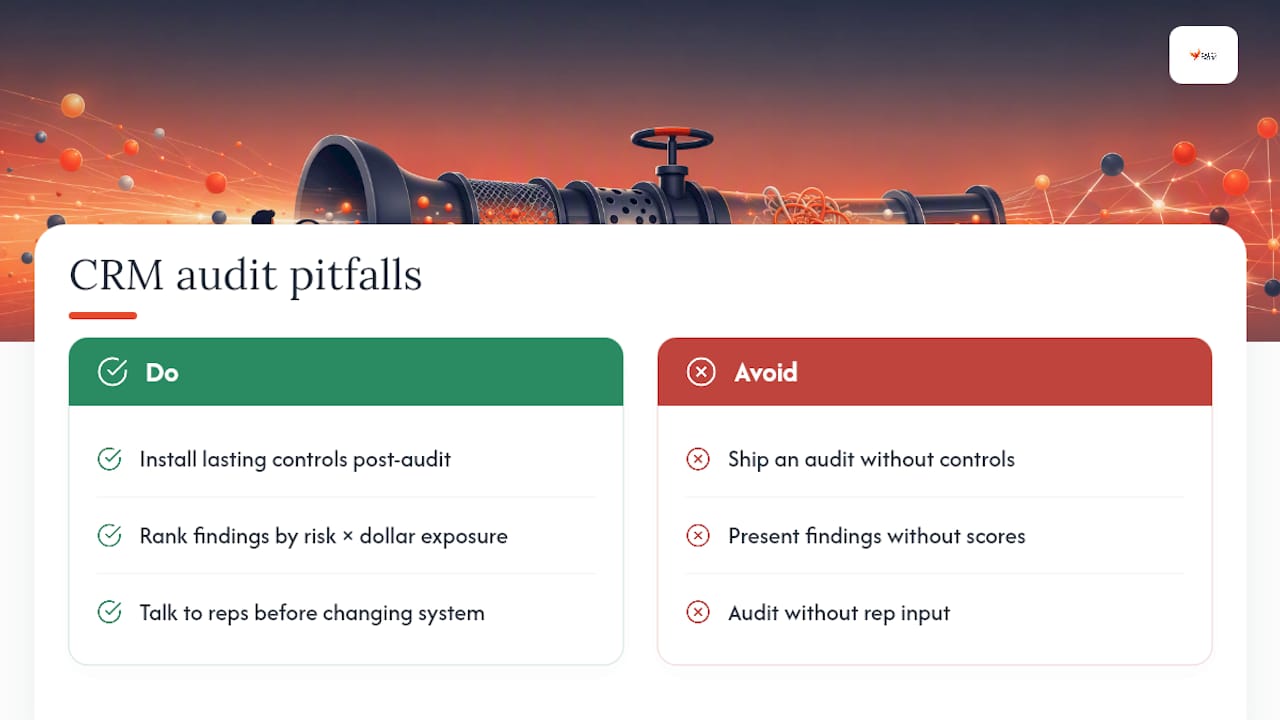
The most common mistake isn't skipping the audit. It's finishing one and never installing controls, so the same duplicate records and stale deals reappear within two quarters. The second mistake is presenting findings without a score attached. Leadership can't fund what it can't rank. The third is auditing the system without ever talking to the reps who use it daily, which means you fix what looks broken instead of what's actually broken.
My heuristic: rank every finding by decision risk multiplied by dollar exposure first, then break ties by how feasible the control is to implement. A cheap fix with no lasting control isn't a fix. It's a rerun of the same audit twelve months from now.
— Hunter
Sources
- How to conduct a thorough CRM audit — Discover CRM
- How to Run a CRM Data Audit in One Week — ORM
- How to run a CRM audit (and why you absolutely should) — Insightly
- Does your sales team object to using CRM? — Yesware