

A lead scoring model assigns a numeric value to each prospect based on how likely they are to convert, using signals about who they are (fit) and what they're doing (intent). The strongest models are built backward: you score historical closed-won and closed-lost leads first, confirm the logic actually separates winners from losers, and only then push weights live. Skip validation and you're not scoring leads, you're guessing with a spreadsheet.
TL;DR:
- Separating fit signals from intent signals helps route more qualified leads efficiently and reduces wasted sales efforts on unqualified prospects.
- Rules-based scoring suits small lead volumes, while predictive models require at least 40 closed deals of each outcome type for reliable training.
- Validating a lead scoring model involves back-testing against historical outcomes and ensuring clear separation between high and low scoring leads, not just trusting the initial setup.
- Incorporating real-time CRM writeback and threshold-based routing ensures scores influence sales actions and improve pipeline management.
- Regularly retraining the model every quarter and monitoring lift and score distribution prevent drift and maintain scoring accuracy over changing buyer behaviors.
Table of Contents
- What a Lead Scoring Model Actually Measures: Fit vs. Intent
- Types of Lead Scoring Models and When Each One Fits
- How to Build a Lead Scoring Model: A Six-Step Checklist
- How to Validate a Lead Scoring Model Before It Goes Live
- Turning Scores Into Rep Behavior: Routing and CRM Setup
- Keeping a Lead Scoring Model Accurate Over Time
- Mistakes That Quietly Wreck a Lead Scoring Model
- How Sales-phoenix Applies Lead Scoring in Client Engagements
- What Actually Separates a Working Model From a Guess
- Get Your Lead Scoring Model Built and Running
- Sources
- FAQ
What a Lead Scoring Model Actually Measures: Fit vs. Intent
Every workable model rests on two separate questions. Fit asks: does this account look like our best customers? Intent asks: is this specific person acting like a buyer right now? Collapse those into one number and you lose the ability to act differently on a great-fit lead who's gone quiet versus a mediocre-fit lead who just requested pricing. That distinction changes what a rep does next, not just how a lead gets ranked.
Fit signals come from firmographic and demographic data. Intent signals come from behavior, and increasingly from third-party research activity you don't directly observe.
- Firmographics: company size, industry, revenue band, geography
- Demographics: job title, seniority, department
- Behavioral signals: pricing page visits, demo requests, email opens, content downloads
- Technographic data: what software stack a company already runs
- Third-party intent: research activity on topics related to your category, pulled from intent data providers
The payoff for combining both dimensions well is measurable. Teams that separate fit from intent typically route fewer dead-end leads to sales, which shortens average time-to-first-touch because reps aren't wasting calls on people who technically clicked a link but will never buy. A well-built lead qualification framework also gives marketing a feedback loop: if a campaign generates high-intent but low-fit leads, that's a targeting problem, not a scoring problem, and the model tells you which one you're facing.
Types of Lead Scoring Models and When Each One Fits
Not every company needs a machine learning model to sort leads. The right starting point depends on lead volume, data maturity, and how much time you have to get it right.
- Rules-based scoring. You assign point values manually (title +10, demo request +25, personal email address ‑15) based on judgment and sales input. It's fast to build and easy for anyone to understand, but it drifts out of sync with reality because nobody goes back and re-weights it after the market shifts. It works best under a few hundred leads a month, where you don't have enough conversions to train anything statistical.
- Predictive scoring. A model learns weights from historical outcomes instead of guesses. Kissmetrics notes that logistic regression handles a few hundred conversions reasonably well, while gradient-boosted trees need a few thousand to outperform simpler methods. Predictive models adapt as behavior changes, but they trade some interpretability. Explaining "the model said so" to a skeptical sales team is harder than pointing to a rule.
- Matrix scoring (fit × intent). Instead of one blended score, you plot fit on one axis and intent on the other, producing four quadrants: high fit and high intent, calls; high fit and low intent, nurture; low fit and high intent, disqualify or fast-track depending on your margins; low fit and low intent, ignore. Some practitioners recommend multiplying the two scores rather than adding them, so a near-zero on either axis drags the whole priority down instead of getting masked by a strong score on the other side.
- Negative scoring. This subtracts points for disqualifying signals, competitor domains, students researching for a paper, job seekers hitting your careers page by mistake. Without it, active-but-irrelevant traffic inflates scores and buries real buyers.
Graduate from rules to predictive once you've got a database with a clean, sizable set of closed outcomes and a data team that can maintain a retraining pipeline. Before that, a well-tuned rules model beats a half-trained statistical one.
How to Build a Lead Scoring Model: A Six-Step Checklist
Building a scoring model isn't a single afternoon project, but it also shouldn't take a quarter. Here's the sequence that keeps teams from getting stuck in analysis paralysis.
- Pick your conversion event and training window. Decide what "converted" means for your business, closed-won deal, sales-accepted opportunity, trial-to-paid, and choose a lookback period long enough to capture a full sales cycle. If your cycle runs 90 days, don't train on the last 30.
- Inventory your signals and run data-quality checks. List every field you could theoretically score: firmographics, page visits, form fills, email engagement. Then check whether the data is actually usable. Bad email validity rates and thin enrichment coverage will quietly wreck a model before it ever reaches a rep's screen. If half your leads have blank job titles, title-based fit scoring is worthless until that's fixed.
- Split signals into fit and intent, and engineer decay. Assign each signal to one bucket or the other. For behavioral signals, build in recency decay so a demo request from six months ago carries less weight than one from last week. Stale activity shouldn't score the same as fresh activity.
- Choose your approach and assign weights. For a rules-based build, assign point values based on sales input and historical intuition, then treat those numbers as a first draft. For a predictive build, Microsoft's Dynamics 365 documentation specifies a practical floor: at least 40 qualified and 40 disqualified closed leads within your training window before the platform will even generate a model. That's a useful sanity check even outside Dynamics. If you don't have 40 of each, stick with rules for now.
- Set thresholds from sales capacity, not round numbers. Don't pick 80 out of 100 because it sounds authoritative. Count how many leads your reps can realistically work per week, then set the top-tier threshold so the number of leads crossing it matches that capacity. A threshold that floods reps with more "hot" leads than they can call in a day trains them to ignore the score entirely.
- Implement CRM writeback and automation triggers. Push the score into the lead or contact record where reps already work, build saved views filtered by score band, and set triggers that fire tasks or alerts when a lead crosses a threshold. A score that lives in a dashboard nobody opens changes nothing.
Pro Tip: Build your rules-based model first even if you plan to go predictive eventually. It gives you a working baseline to compare the predictive model against, and it forces you to define your conversion event and signal list before you touch any statistics.
How to Validate a Lead Scoring Model Before It Goes Live
A score with no back-test behind it is a hypothesis wearing a number, not a working tool. Validation is what separates a real model from an educated guess dressed up in a spreadsheet.

The standard method: apply your scoring logic retroactively to leads you already know the outcome of. Clay recommends scoring your last 30 to 50 closed-won deals alongside a matched set of closed-lost leads, then checking whether the winners cluster at the top of the score range and the losers cluster at the bottom.
Three metrics tell you whether that clustering is real:
- Conversion by score band. Plot conversion rate against score tier. Pecan AI describes a healthy model as a staircase, something like 18% conversion in the hot band, 7% in warm, 1.5% in cold. If your bands don't separate that cleanly, the model isn't discriminating.
- Lift. Compare the conversion rate of your top decile against your overall baseline conversion rate. A strong lift means your best-scored leads convert meaningfully better than an unsorted list would.
- AUC (area under the curve). For predictive models, this single number summarizes how well the model ranks positives above negatives across every possible threshold, and it's the readiness signal Dynamics 365 uses before letting a model publish.
If the bands don't separate and lift is flat, don't route leads on that model yet. Re-weight the rules, add missing signals, or delay CRM rollout until a second back-test shows real separation. Shipping an unvalidated score to your sales team costs you credibility you don't get back easily; once reps learn to ignore "hot" leads, retraining that trust takes far longer than retraining the model.
Turning Scores Into Rep Behavior: Routing and CRM Setup
A model that never reaches a rep's screen has no operational value, no matter how clean its back-test looked. The score needs a home in the CRM record itself, not a separate report someone checks once a week.
Store the score as a field on the lead or contact object, visible in the same view reps already use for their pipeline. From there, build the mechanics that turn a number into action:
- Threshold-based routing. Say your reps can handle 15 new hot leads per week each, and you have 10 reps. That's 150 slots. Set your top-tier threshold so roughly that many leads per week cross it, not more, not fewer.
- Saved views by score band. Give reps a filtered view showing only hot and warm leads, so they're not scrolling past cold ones to find what matters.
- Score-change triggers. When a lead crosses from warm to hot, fire a task assignment or a Slack alert. Waiting for the next scheduled report defeats the purpose of real-time scoring.
- Alerting on decay. If a hot lead's score drops because activity went cold, flag it for a check-in before the deal quietly dies.
Pro Tip: Give reps a one-line explanation of why a lead scored high, not just the number. "Visited pricing page twice + VP title" builds trust in the score fast; a bare 87 out of 100 invites skepticism and gets ignored within a month.
Done right, this is where revenue intelligence dashboards earn their keep. Reps stop guessing which leads matter, and managers get a real-time view of where the pipeline is actually strong.
Keeping a Lead Scoring Model Accurate Over Time
Markets shift, buyer behavior shifts, and a model trained on last year's closed deals slowly drifts out of sync with this year's reality. Treat maintenance as part of the model's lifecycle, not an optional cleanup task.
A quarterly retrain is a reasonable baseline for most B2B sales cycles. Accelerate that cadence after a major product launch, a pricing change, or a shift into a new market segment, any event that changes what a "good fit" lead even looks like.
Watch for these drift indicators:
- Falling lift. Kissmetrics recommends tracking lift monthly; a steady decline is your clearest signal that retraining is overdue.
- Distribution shifts. If suddenly every lead scores in the middle band, something changed in how signals are captured, not in your buyers.
- Changed feature importances. A signal that used to predict conversion well, like demo requests, may stop mattering if your product or sales motion has changed.
Pair retraining with a basic data hygiene routine: dedupe records regularly, monitor enrichment coverage so fit signals stay populated, and track valid email rates so behavioral signals aren't built on bounced addresses.
Mistakes That Quietly Wreck a Lead Scoring Model
Most broken scoring models fail for the same handful of reasons, and none of them require a data science degree to fix.
- Activity bias. Scoring every email open and newsletter click the same as a demo request rewards passive engagement over real buying signals. Weight pricing-page visits and demo requests far higher than a newsletter open.
- No negative scoring. Without subtracting points for competitor domains, students, or job seekers, your "hot" list fills up with people who will never buy.
- Blending fit and intent into one number. This erases the difference between "call now" and "nurture for six months," which are two completely different plays for a rep.
- Skipping validation before rollout. A model that hasn't been back-tested against real closed outcomes is an assumption, not a system.
- Never re-checking after changes. Every time you add a signal or adjust a weight, re-run the back-test. A single untested tweak can quietly break separation you spent months building.
How Sales-phoenix Applies Lead Scoring in Client Engagements
Sales-phoenix builds scoring models inside its Phoenix Growth Framework™, starting with a data audit to check enrichment coverage and email validity, then a fit-and-intent model build, then a structured handoff into CRM routing and rep workflows. Teams considering outside help should check three things first: closed-deal data volume, CRM writeback readiness, and whether reps currently trust their existing lead list at all.
What Actually Separates a Working Model From a Guess
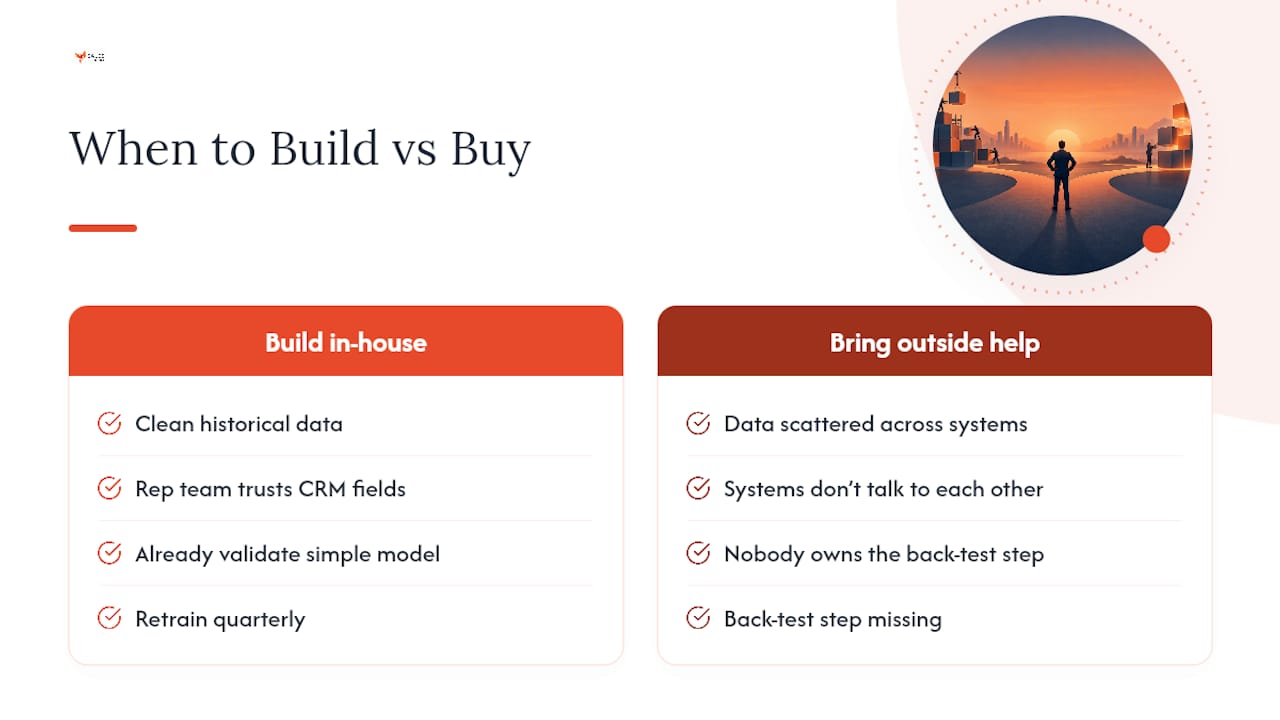
Back-test first, retrain quarterly, and set thresholds to sales capacity, not to what sounds impressive in a slide deck. Those three habits catch more broken models than any amount of feature engineering. Most teams reach for a fancier algorithm when their real problem is that nobody validated the simple version before shipping it.
Build in-house when you have clean historical data and a rep team that already trusts CRM fields enough to act on them. Bring in outside help when the data is scattered across systems that don't talk to each other, or when nobody internally owns the back-test step, that gap is exactly where scoring projects quietly die.
— Hunter
Get Your Lead Scoring Model Built and Running
Most teams don't fail at lead scoring because the math is hard. They fail because nobody owns the data audit, the back-test, or the CRM handoff that turns a spreadsheet formula into something reps actually trust. Sales-phoenix closes that gap directly: Phoenix Sales Intelligence builds the fit-and-intent model, validates it against your closed-won and closed-lost history, and hands it off with routing already wired into your CRM.
An initial engagement typically starts with a data audit, moves into model design and back-testing, and ends with the writeback and automation triggers that make scores change what reps actually do each morning. If your database has enough closed history to validate against but nobody has done the work, that's the exact gap this closes. Start with a Revenue Leak Assessment to see where your current pipeline visibility is breaking down before you build anything new.
Sources
For teams wanting to go deeper on the mechanics covered here, Microsoft's Dynamics 365 documentation details predictive scoring's data minimums, Clay's build guide covers back-testing methodology in depth, Pecan AI walks through score-band auditing, and Kissmetrics breaks down model selection by data volume. For broader context on operationalizing AI in revenue teams, see Benchmarked and Autonomous Firm.
- Configure predictive lead scoring - Dynamics 365 Sales
- How to Build a Lead Scoring Model (2026) | Clay
- How to Build a Lead Scoring Model That Actually Predicts Conversions | Pecan AI
- AI lead scoring workflow | Kissmetrics
FAQ
How Is a Lead Score Calculated?
A lead score is calculated by adding or weighting points across fit signals (title, company size, industry) and intent signals (demo requests, pricing page visits, email engagement), then applying decay so recent activity counts more than old activity. In a predictive model, those weights come from a statistical model trained on historical closed-won and closed-lost data rather than manual point assignments, and Microsoft requires at least 40 of each outcome type before it will generate one.
Can You Give an Example of Lead Scoring in Action?
A common example: a VP of Operations at a mid-sized company (strong fit, +40 points) requests a demo and visits the pricing page multiple times in one week (strong intent), landing well into the hot tier and triggering an immediate rep alert. A marketing intern downloading a whitepaper from a personal email address might score positively on intent but get knocked down by negative scoring for a non-business domain, keeping them out of the sales queue entirely.
What Is Einstein Lead Scoring in Salesforce, and How Does It Work?
Einstein Lead Scoring is Salesforce's built-in predictive scoring feature, which analyzes historical CRM data to identify patterns among converted versus unconverted leads and assigns a score based on those learned patterns. It works conceptually the same way any predictive model does: it needs a reasonable volume of closed outcomes to train on, and it should still be back-tested against your own closed-won and closed-lost data rather than trusted blindly out of the box.
What Are the Best Types of Tools for Lead Scoring?
The right tool category depends on your data maturity rather than any single "best" option. CRM-native predictive scoring features suit teams already centralized in one platform, standalone AI scoring platforms suit teams needing more model flexibility, and rules-based scoring built directly into marketing automation platforms suits smaller lead volumes without enough closed deals to train a statistical model yet. Teams without in-house data science support often bring in outside help, like Sales-phoenix's Phoenix Sales Intelligence, to handle the model build and validation directly.